
Flat Equalizer - Bass Booster
Beat Blend LabsMusic & Audio
4.715.58K Reviews
- Version
- 6.3.5.6
- Installs
- 10.00M
- Age Rating
- Everyone
Screenshots
Our Review of Flat Equalizer - Bass Booster
 Analysis by Appyee
I usually reach for an equalizer when my headphones make a familiar playlist sound too thin, or when a podcast is hard to hear over the noise around me. Flat Equalizer - Bass Booster is built for that sort of hands-on adjustment: it gives me a way to shape playback on an Android phone instead of settling for one sound profile everywhere. The key is to make small changes and listen carefully; more bass or volume is not automatically better.
Start with the sound you actually have
Before changing anything, I’d pick one song or spoken track I know well and listen at a comfortable volume. That gives me a useful reference when trying the equalizer. A bass-heavy preset might flatter electronic music but make a voice-led podcast muddy, while a brighter setting can bring out detail yet become tiring on sharp recordings. Starting with familiar material helps me tell whether a change improves the sound or simply makes it different.
This is a music and audio app from Beat Blend Labs, and its purpose is adjustment rather than playback or music discovery. It is free to install, with in-app purchases listed from $0.99 to $99.99 per item. Its Everyone age rating makes it broadly suitable, though I’d still treat volume controls responsibly, especially when listening through headphones.
Getting Started with Flat Equalizer
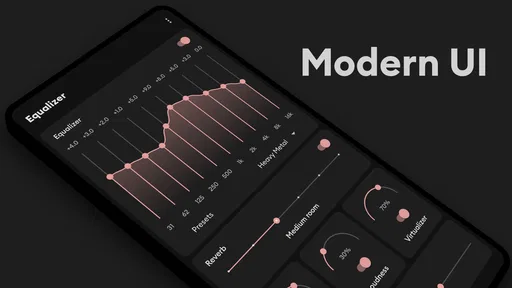
First things first, downloading Flat Equalizer - Bass Booster from the app store was a breeze. It’s available for both Android and iOS, so no one’s left out. Once you fire it up, you’re greeted by a clean and intuitive interface. I’m talking sleek sliders and dials that even a newbie could navigate without breaking a sweat.
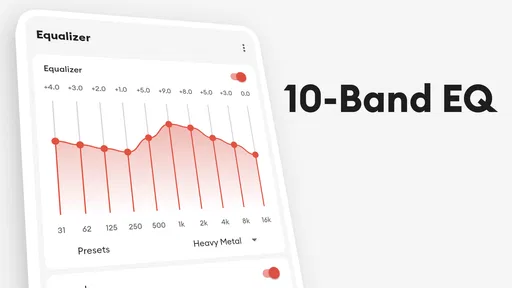
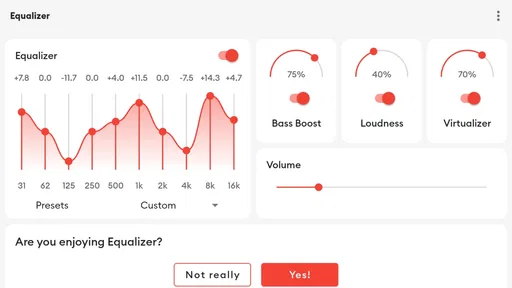
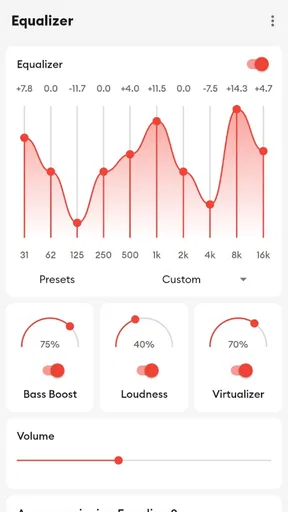
The app gives you a range of options to tweak your sound, with a ten-band equalizer that lets you adjust frequencies to your heart’s content. If you’re not an audio engineer (and I’m definitely not), don’t worry. There are plenty of presets based on different music genres like rock, jazz, and classical to make your life easier.
Make a change, then check the handoff
My preferred workflow is to choose a preset as a starting point, listen to a familiar track, and then move only the sliders that address what I hear. If the low end is overwhelming, I reduce it rather than raising every other band to compensate. If a vocal sounds buried, a modest adjustment in the relevant range is more sensible than turning up the whole mix. The point of an equalizer is to correct a mismatch between source, headphones, and taste—not to max out every control.
There is one practical handoff to keep in mind: the app adjusts audio being played elsewhere, so the result depends on the player and the listening route. I’d test the same short section after changing a setting, and check again if I switch from headphones to a phone speaker or another output. A setting that works on one pair of headphones may sound boomy or harsh on another. If the effect seems missing, I’d first confirm that the audio route and the app’s processing are active rather than immediately pushing the sliders harder.
Boosting That Bass
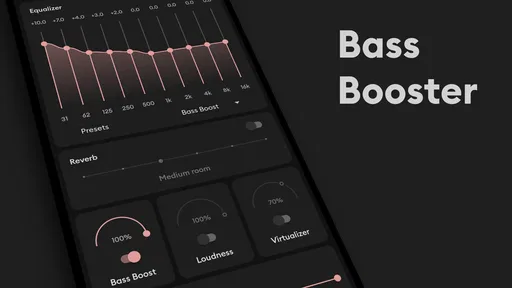
Now, let’s talk about the bass booster feature. You know how sometimes you just want that extra oomph to your music? Well, this app delivers! With a simple tap, you can activate the bass boost, and believe me, you’ll feel it. It’s like having a subwoofer in your pocket. Perfect for those bass-heavy tracks that need a little extra kick.
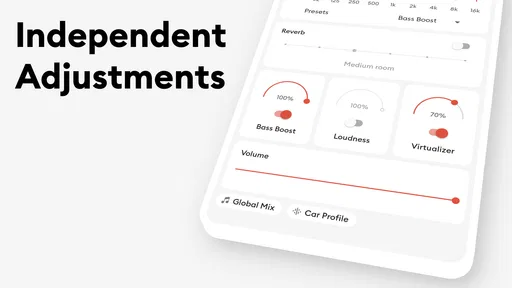
But hey, it’s not all about shaking the room. The app also offers a virtualizer feature that enhances the stereo sound stage, making it feel like the audio is surrounding you. It’s pretty cool and definitely adds another layer to your listening experience.
Use effects with a light touch
For a commute, I might use a little bass lift to give a quiet track more presence, then turn it down again when switching to spoken audio. The virtualizer is more of a taste choice: it can make stereo material feel wider, but it won’t restore detail that was never in the recording, and its effect can feel artificial on some tracks. I treat it as an optional flavor rather than a setting that should stay on all day.
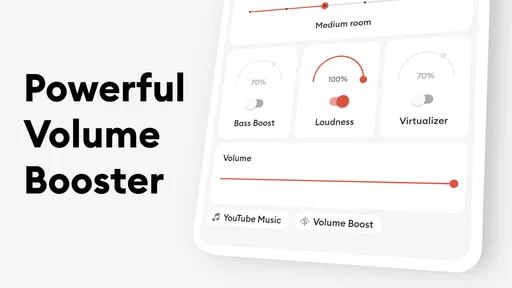
The same restraint applies to loudness. Turning up perceived intensity can make a track easier to hear, but it can also make already loud material fatiguing. I’d make comparisons at roughly the same listening level, since the louder version can seem better even when it is simply louder. If I notice distortion, harshness, or an uncomfortable amount of bass, I back off instead of assuming the phone needs an even stronger boost.
Feature Highlights
Aside from the basic equalizer and bass boost, the app sports some additional features worth mentioning. There’s a reverb effect that can give your music that concert hall vibe, along with a loudness enhancer to make sure every note is heard loud and clear.
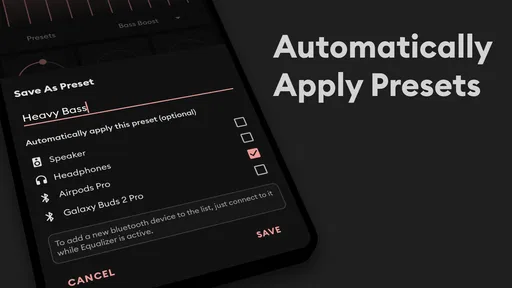
Plus, you can save your custom presets, which is super handy if you find the perfect settings and don’t want to lose them. I also appreciated the widget support, allowing me to control the equalizer straight from my home screen without needing to dive back into the app.
Keep useful settings separate
Saved presets are most valuable when they solve different situations, rather than when they are tiny variations with names I’ll forget. I’d keep one restrained profile for everyday headphones and another for a particular listening setup only if the difference is genuinely noticeable. That makes it easier to return to a known sound after experimenting. The widget can make switching more convenient, but I’d still check what is active before starting a call, podcast, or playlist; a bass-heavy music setting is not necessarily a good default for voices.
Reverb is an effect I’d use sparingly. It can add a roomy character to dry recordings, but it also changes the apparent space around the sound and may blur detail. For podcasts, interviews, or music that already has a strong sense of room, I’d usually leave it off. This is a useful example of why having more controls does not mean every control should be engaged at once.
How Does It Perform?
In terms of performance, Flat Equalizer - Bass Booster runs smoothly without any noticeable lag or crashes during my testing. The real-time audio processing is impressive, and changes to the equalizer settings are applied instantly, which is exactly what you want when you’re in the groove.
Battery usage is always a concern with apps that run in the background, but I didn’t notice any significant drain. The developers have done a good job optimizing it, so you can keep your tunes pumping without worrying about your phone dying halfway through the day.
When a different option makes more sense
Compared with the equalizer controls built into a music player, a separate sound tool can be appealing when I want adjustments available beyond one listening app. The trade-off is that system-wide audio processing can be less predictable: the effect may depend on the player, output route, and how the phone handles audio. If I only listen in one app and its built-in equalizer already gives me the control I need, staying there is simpler and avoids managing another layer.
I’d also choose a dedicated audio player instead if my main need were organizing a local library, browsing albums, or managing playback. This app’s role is sound shaping, not replacing those tools. And if I want an accurate, unchanged mix for critical listening, I would leave processing off; equalization is personal correction, not a guarantee of higher fidelity. The most suitable choice depends on whether I want convenience and adjustment or a clean, consistent signal.
Who will get the most from it?
I think it suits listeners who notice that their headphones or phone speaker consistently make music too bass-heavy, too thin, or difficult to balance, and who are willing to experiment patiently. It is also useful for someone who moves between music and spoken audio and wants saved settings for those different habits. The Android release works on devices running version 5.0 or later, and the app has reached over ten million installs, with a 4.7 average from around 575,000 ratings. Its current version is 6.3.5.
For a realistic everyday example, imagine starting a morning commute with a playlist, then switching to a podcast on the way home. I’d use a modest music preset on the commute, keep bass boost low enough that the beat does not mask vocals, and switch to a clearer, less processed profile for speech. If the second setting makes the podcast sound sharp, I’d reduce the adjustment instead of raising the volume. That small routine is more useful than constantly changing several controls without a reference.
By contrast, I’d skip it if I’m happy with my current sound, dislike tuning audio, or expect one setting to improve every headphone and every recording. People who want loudness above all else may also be disappointed by the trade-off: aggressive boosts can make sound less comfortable, not better. The app rewards a little listening and restraint, so it is a poor fit for anyone looking for a completely automatic fix.
Final Thoughts
So, is Flat Equalizer - Bass Booster worth downloading? If you’re serious about taking control of your audio experience, then absolutely. The app is packed with features that cater to both casual listeners and audiophiles alike. It’s user-friendly, effective, and most importantly, it makes your music sound fantastic.
Whether you’re just looking to tweak a few settings or completely transform your sound, this app has got you covered. So go ahead, give it a try, and let your ears enjoy the ride!
A sensible way to decide
I’d judge the result by whether I can listen more comfortably, not by how dramatic the effect sounds in the first few seconds. I’d start from a preset or a flat baseline, adjust one thing at a time, save a profile only when it proves useful, and revisit it after changing headphones. That workflow keeps the app practical and makes it easier to undo an experiment that does not suit the music.
Overall, this is a focused choice for Android listeners who want direct control over tone, bass, and a few spatial effects without turning audio adjustment into a technical project. Its strongest point is the range of ways to tailor sound; its main caveat is that those choices require judgement and may not behave identically across every playback route. Used gently, it can help familiar tracks fit your own listening setup. If you prefer the untouched mix or already like your player’s controls, you may not need another layer.
Verdict
Strengths of Flat Equalizer - Bass Booster
- Intuitive user interface for easy navigation.
- Customizable sound presets for different genres.
- Compatible with most music streaming apps.
- Minimal impact on device battery life.
- Adjusts sound without distortion at high volumes.
Limitations of Flat Equalizer - Bass Booster
- Ads can be intrusive during usage.
- Limited features in the free version.
- Some settings may reset on reboot.
- Occasional lag with older devices.
- Requires access to device audio settings.
Other Releases by Beat Blend Labs
View All
Drum Set - Drumming App
Music3.8

Perfect Tuner
Music & Audio4.2
Similar Picks in This Category
View All
YouTube Music
Google LLC4.4

Samsung Music
Samsung Electronics Co., Ltd.3.8

Spotify: Music and Podcasts
Spotify AB4.3

JioSaavn - Music & Podcasts
Saavn Media Limited4.3

Lark Player:Music Player & MP3
Lark Player Studio - Music, MP3 & Video Player4.6

StarMaker: Sing Karaoke Songs
SKYWORK AI PTE. LTD.4.3
Frequently Asked Questions
What is Flat Equalizer - Bass Booster and what does it do?
Flat Equalizer - Bass Booster is an audio enhancement app designed for Android devices. It allows users to customize their sound experience by adjusting bass, treble, and other audio frequencies. The app supports a variety of audio formats and can be used with music players, video players, and streaming services to enhance sound quality.
Is Flat Equalizer - Bass Booster compatible with all Android devices?
Flat Equalizer - Bass Booster is compatible with most Android devices running Android 5.0 and above. However, performance may vary depending on the device's hardware specifications and software version. It’s recommended to check the app's compatibility with your specific device on the Google Play Store before downloading.
Does Flat Equalizer - Bass Booster require root access?
No, Flat Equalizer - Bass Booster does not require root access to function. The app is designed to work seamlessly on non-rooted devices, providing a user-friendly interface and easy-to-use features that enhance audio quality without the need for complex modifications.
Are there any in-app purchases in Flat Equalizer - Bass Booster?
Yes, Flat Equalizer - Bass Booster offers in-app purchases. While the basic features are free, users can access additional premium features, such as advanced equalizer settings and ad-free experience, through optional purchases. These purchases help support the app's development and maintenance.
How does Flat Equalizer - Bass Booster affect battery life?
Using Flat Equalizer - Bass Booster may lead to increased battery consumption, as it processes audio in real-time to enhance sound quality. However, the impact on battery life is generally minimal. It's advisable to monitor your device's battery usage and adjust settings as needed to optimize performance.
